

11 KiB
Audit against your brokerage
Goal: catch drift between what zfin thinks you hold and what your
brokerage actually reports -- wrong share counts, sales you forgot to
record, missing lots, stale manual prices -- by reconciling
portfolio.srf against a positions export.
You'll need: a portfolio whose accounts.srf
entries carry institution:: and account_number:: (that's how zfin
ties an export back to your accounts -- see
How accounts are matched), plus an export
from a supported broker.
Heads up: this is the most heuristic corner of zfin. The brokerage parsers are format-specific, account matching depends on metadata you maintain, and the comparison uses deliberate tolerances. It's the best way to keep your records honest, but expect a little setup and the occasional "why didn't that match?" -- this guide covers the gotchas, not just the happy path.
Supported brokers and how to export
zfin audit reconciles against Fidelity and Schwab. (Wells
Fargo is handled by import, not audit.)
| Broker | How to export | Flag |
|---|---|---|
| Fidelity | Positions tab -> the three-dot (⋮) menu -> Download (a CSV) | --fidelity <CSV> |
| Schwab (per-account) | Accounts -> Positions -> Export (one CSV per account) | --schwab <CSV> |
| Schwab (summary) | Accounts -> Summary: select the accounts table and copy it (what to copy) | --schwab-summary |
The two Schwab inputs differ in detail: the per-account CSV has full per-position data (shares, price, value); the summary paste carries only each account's cash and total value, so it reconciles totals, not individual holdings. Use the summary for a quick "are my account totals right?", the CSV for position-level checks. (Fidelity money-market rows and Schwab "Cash & Cash Investments" rows are recognized as cash.)
The Fidelity Download isn't a top-level button -- it's behind the three-dot (⋮) menu at the top-right of the positions panel:
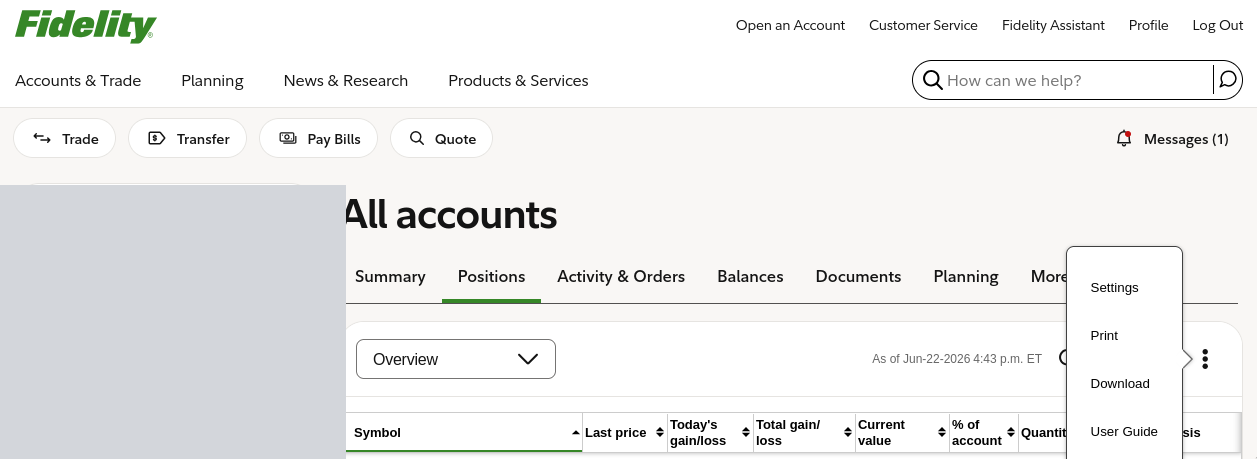
(The account list down the left side is blanked out above.)
Schwab summary: what to copy
The summary paste comes from Schwab's Accounts -> Summary page.
Scroll to the Accounts table, drag-select from the first account's
name through the last row, and copy. Then either save it as a .txt
file in your audit/ folder (where auto-discovery will find it) or pipe
it straight in:
zfin audit --schwab-summary # paste, then Ctrl-D
A good paste is repeating three-line blocks -- the account name, the "ending in" line, then a values line -- and looks about like this (figures fictional):
Sample Roth IRA
Account number ending in 1234 ...1234
Type IRA $46.44 $227,058.15 +$1,072.88 +0.47%
Sample Brokerage
Account number ending in 5678 ...5678
Type Brokerage $12,500.00 $980,000.00 +$3,200.00 +0.33%
Sample Trust
Account number ending in 9012 ...9012
Type $2,000.00 $415,300.00 +$1,150.00 +0.28%
zfin anchors on each "Account number ending in" line (its trailing digits are the account number) and reads the first two dollar figures on the line below as cash then total value -- everything else on that line is ignored, and the account-type word is optional. If your copy looks nothing like this -- no "ending in" lines, or no dollar figures -- you grabbed the wrong region. Because it carries only cash and totals, the summary reconciles account totals, not individual positions.
Run it
Point it at a file:
ZFIN_HOME=~/finance zfin audit --fidelity ~/Downloads/Portfolio_Positions.csv
ZFIN_HOME=~/finance zfin audit --schwab   ~/Downloads/Positions-Individual.csv
ZFIN_HOME=~/finance zfin audit --schwab-summary    # then paste the page, Ctrl-D
Or run it with no flags -- zfin audit does a portfolio hygiene
check and auto-discovers and reconciles any recent exports it finds
(next two sections).
The hygiene check
With no flags, zfin audit first prints a health report:
- Stale manual prices -- lots with a manual
price::older than--stale-days(default 3). - Accounts overdue for update -- accounts past their
update_cadence(see accounts.srf). - Brokerage files it discovered, which it then reconciles.
  Portfolio hygiene

  Stale manual prices (>3 days - --stale-days to configure)
    (none)

  Accounts overdue for update (weekly default - set update_cadence in accounts.srf)
    Sample IRA                       weekly    no update history found
    Sample Brokerage                 weekly    no update history found
"No update history found" is a nudge, not an error -- silence accounts
you don't actively track with update_cadence::none.
Auto-discovery (and your download folder)
With no --fidelity/--schwab flag, zfin looks for exports in two
places:
$ZFIN_AUDIT_FILES-- a directory you set. Point it at wherever your browser saves downloads (e.g.~/Downloads) so a just-downloaded export is found with no copying or renaming. (zfin does not scan it on its own -- you opt in by setting this.)<portfolio-dir>/audit/-- a dedicated subfolder next to yourportfolio.srf, for exports you want to keep around.
What it considers:
- Only files modified in the last 24 hours. Your browser saves the
export to its download folder with names like
Portfolio_Positions_Jun-19.csv; the recency window keeps zfin reconciling the one you just pulled, not last quarter's. - Detected by content, not filename. zfin sniffs the first lines --
Fidelity begins
Account Number/Account Name, a Schwab CSV begins"Positions for ..., a Schwab summary containsAccount number ending in. A renamed file still works; an unrelated CSV is skipped.
So with ZFIN_AUDIT_FILES=~/Downloads, the workflow collapses to
"download from your broker, run zfin audit, done."
How accounts are matched
This is the part that trips people up. An export covers one or more
accounts, and zfin has to tie each one to an account in your
portfolio. It does that through
accounts.srf:
- The export carries an account number -- Schwab's from the "Positions for account ...1234" title, Fidelity's from the Account Number column, the summary's from "...ending in 1234".
- zfin finds the
accounts.srfentry whoseinstitution::(fidelity,schwab) andaccount_number::match, and compares against that account's lots. - No match -> the account is shown as
unmappedand flagged as a discrepancy. Fix it by addinginstitution::andaccount_number::to that account inaccounts.srf(a placeholder number you recognize is fine -- it just has to match what the export shows).
Reading the report
zfin treats the brokerage as the source of truth and shows, per account, your portfolio (PF) against the broker (BR). Figures below are illustrative and fictional:
Portfolio Audit  (brokerage is source of truth)
========================================

  Sample Brokerage *1234
    Symbol      PF Shares   BR Shares   PF Price   BR Price
    VTI           100.000     100.000     373.38     373.38   ok
    SCHD          200.000     210.000      31.86      31.86   brokerage +10.000
    AGG            50.000       0.000                          portfolio only
- Portfolio-only rows are lots the broker no longer shows -- a sale you forgot to remove, or a mistyped symbol.
- Brokerage-only rows are holdings missing from your portfolio.
- A share or value delta flags a count or price mismatch.
--verbose prints the full comparison even when everything reconciles.
Why "close" counts as a match
- Cash matches to the penny. It's an exact figure on both sides, so any gap is real (e.g. money-market dividend accrual between updates) and worth surfacing.
- Securities get ~$1 of slack. A sub-cent NAV-rounding difference on a six-figure fund position can exceed a dollar without being actionable, so small value deltas are tolerated -- but share-count mismatches never are.
Institutional share classes
If a lot is priced through a retail-ticker ticker:: alias while the
account actually holds an institutional class (a different NAV), audit
compares against the broker's NAV and can suggest a price_ratio to
bridge the gap. Accounts flagged direct_indexing::true get the same
treatment to track drift. See
price resolution.
Why it's finicky
- The parsers are broker-specific and hardcode each export's column layout -- if Fidelity or Schwab changes their format, parsing can break (Fidelity's header is validated to catch this; Schwab's is not). They are not full RFC-4180 CSV parsers (no escaped quotes or multi-line fields) -- fine for the real exports, not for arbitrary CSVs.
- Matching is only as good as the
institution::/account_number::entries you keep inaccounts.srf. - Options and cash are reconciled separately from share counts.
None of this is a reason to skip it -- it's the single best way to keep your records honest -- just know it expects some setup and an occasional manual nudge.
What about Wells Fargo?
Wells Fargo's portal has no clean positions export, so it isn't an
audit target. Instead, zfin import --wells-fargo
rebuilds a portfolio file from a paste of the WF positions table (copy
the rendered table from the brokerage portal and save it to a file).
Fidelity and Schwab exports can be imported the same way.
Keep brokerage exports private. They contain real account numbers and holdings. Store them outside any git repository and delete them when you're done reconciling.
Next steps
zfin auditreference -- every flag.- Map your accounts -- the
institution/account_numbermatching keys. zfin import-- build a portfolio file from an export (including Wells Fargo).
Previous: Plan for retirement | Next: A periodic review | Documentation home