

21 KiB
Audit against your brokerage
Goal: catch drift between what zfin thinks you hold and what your
brokerage actually reports -- wrong share counts, sales you forgot to
record, missing lots, stale manual prices -- by reconciling
portfolio.srf against a positions export.
You'll need: a portfolio whose accounts.srf
entries carry institution:: and account_number:: (that's how zfin
ties an export back to your accounts -- see
How accounts are matched), plus an export
from a supported broker.
Heads up: this is the most heuristic corner of zfin. The brokerage parsers are format-specific, account matching depends on metadata you maintain, and the comparison uses deliberate tolerances. It's the best way to keep your records honest, but expect a little setup and the occasional "why didn't that match?" -- this guide covers the gotchas, not just the happy path.
Supported brokers and how to export
zfin audit reconciles against Fidelity and Schwab. (Wells
Fargo is handled by import, not audit.)
| Broker | How to export | Flag |
|---|---|---|
| Fidelity | Positions tab -> the three-dot (⋮) menu -> Download (a CSV) | --fidelity <CSV> |
| Schwab (per-account) | Accounts -> Positions -> Export (one CSV per account) | --schwab <CSV> |
| Schwab (summary) | Accounts -> Summary: select the accounts table and copy it (what to copy) | --schwab-summary |
The two Schwab inputs differ in detail: the per-account CSV has full per-position data (shares, price, value); the summary paste carries only each account's cash and total value, so it reconciles totals, not individual holdings. Use the summary for a quick "are my account totals right?", the CSV for position-level checks. (Fidelity money-market rows and Schwab "Cash & Cash Investments" rows are recognized as cash.)
The Fidelity Download isn't a top-level button -- it's behind the three-dot (⋮) menu at the top-right of the positions panel:
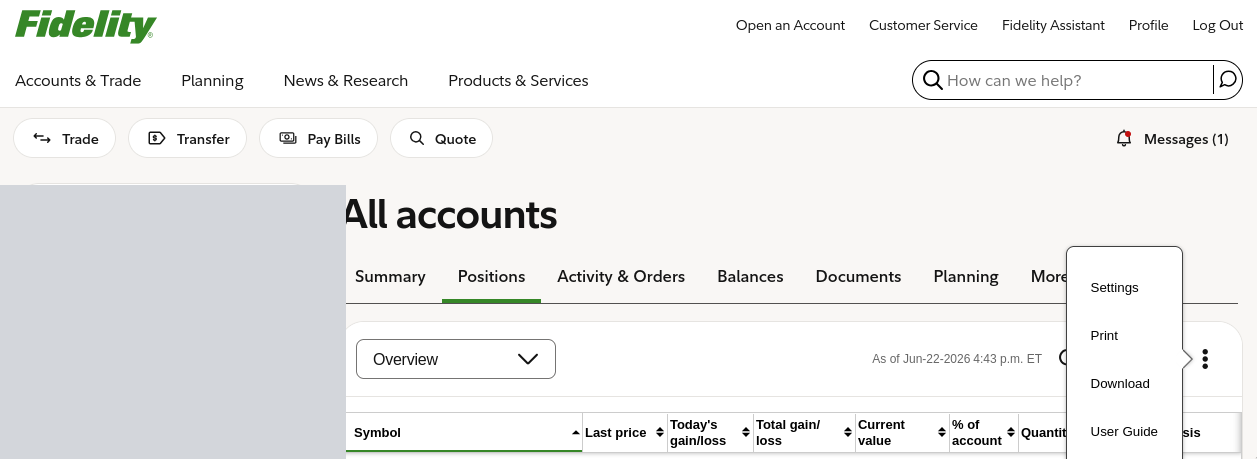
(The account list down the left side is blanked out above.)
Schwab summary: what to copy
The summary paste comes from Schwab's Accounts -> Summary page.
Scroll to the Accounts table, drag-select from the first account's
name through the last row, and copy. Then either save it as a .txt
file in your audit/ folder (where auto-discovery will find it) or pipe
it straight in:
zfin audit --schwab-summary # paste, then Ctrl-D
A good paste is repeating three-line blocks -- the account name, the "ending in" line, then a values line -- and looks about like this (figures fictional):
Sample Roth IRA
Account number ending in 1234 ...1234
Type IRA $46.44 $227,058.15 +$1,072.88 +0.47%
Sample Brokerage
Account number ending in 5678 ...5678
Type Brokerage $12,500.00 $980,000.00 +$3,200.00 +0.33%
Sample Trust
Account number ending in 9012 ...9012
Type $2,000.00 $415,300.00 +$1,150.00 +0.28%
zfin anchors on each "Account number ending in" line (its trailing digits are the account number) and reads the first two dollar figures on the line below as cash then total value -- everything else on that line is ignored, and the account-type word is optional. If your copy looks nothing like this -- no "ending in" lines, or no dollar figures -- you grabbed the wrong region. Because it carries only cash and totals, the summary reconciles account totals, not individual positions.
Run it
Point it at a file:
ZFIN_HOME=~/finance zfin audit --fidelity ~/Downloads/Portfolio_Positions.csv
ZFIN_HOME=~/finance zfin audit --schwab   ~/Downloads/Positions-Individual.csv
ZFIN_HOME=~/finance zfin audit --schwab-summary    # then paste the page, Ctrl-D
Or run it with no flags -- zfin audit does a portfolio hygiene
check and auto-discovers and reconciles any recent exports it finds
(next two sections).
The hygiene check
With no flags, zfin audit first prints a health report:
- Stale manual prices -- lots with a manual
price::older than--stale-days(default 3). - Accounts overdue for update -- accounts past their
update_cadence(see accounts.srf). - Brokerage files it discovered, which it then reconciles.
- Config file problems -- field-name typos in your
.srffiles, impossible lot dates, and values zfin had to ignore or adjust.
  Portfolio hygiene

  Stale manual prices (>3 days - --stale-days to configure)
    (none)

  Accounts overdue for update (weekly default - set update_cadence in accounts.srf)
    Sample IRA                       weekly    no update history found
    Sample Brokerage                 weekly    no update history found
"No update history found" is a nudge, not an error -- silence accounts
you don't actively track with update_cadence::none.
Config file problems
Your .srf files can be wrong in ways that don't stop them loading.
zfin reads what it understands and quietly ignores or works around the
rest, so a mistake can change your numbers with no error at all.
zfin audit checks portfolio*.srf, accounts.srf, metadata.srf,
transaction_log.srf, projections.srf, and watchlist.srf for three
kinds of problem, and prints nothing when there aren't any:
  Config file problems
    portfolio.srf
      line 3: unrecognized field 'price_dat' - did you mean 'price_date'?
      line 4: BND close_date 2062-03-14 is in the future - the lot is still counted as held until then
      line 5: AAPL has close_date but no close_price - the sale's realized gain is recorded as 0
      valid fields:
        symbol shares open_date open_price close_date close_price note
          label account security_type maturity_date rate drip ticker price
          price_date price_ratio split_factor underlying strike multiplier
          option_type
    accounts.srf
      line 2: account 'Sample Brokerage': audit_large_lot_threshold must be > 0 (got 0); ignored, so the audit uses its default
      line 4: account 'Sample Roth': tax_mix_* must not name the account's own tax_type; the tax mix is ignored and the account counts wholly as roth
Each finding names the line of the record it came from, and the date and value findings also say what zfin is doing instead of what you wrote.
1. Field names (every file)
SRF matches record keys against field names exactly. A key that matches
nothing is discarded without complaint -- a misspelled price_dat::
is indistinguishable from having left the price date out. Most fields
have defaults, so most typos change behavior with no output at all.
| Report | Meaning |
|---|---|
did you mean '...'? |
A dropped or doubled character. The suggested name is a real field. |
differs only by case |
Account is not account. Matching is case-sensitive, so this silently does nothing. |
ignored for security_type |
A real field that this kind of lot never reads -- e.g. rate outside a cd. |
appears twice |
SRF keeps the first occurrence. Editing the second one has no effect. |
derived by zfin |
zfin computes this field; a hand-written value is overwritten. Delete it. |
unrecognized field |
No match and no close relative. Check it against the valid fields list. |
The suggestions are deliberately cautious -- they only fire when a real
field name is a prefix of what you typed, or differs from it only by
case -- so a suggestion is never a guess. That means a typo in the
middle of a name (update_cadance) gets no suggestion, which is why
the valid fields list is printed whenever a field name is in
question. It comes straight from the code, so unlike any document it
cannot be out of date.
2. Lot dates (portfolio*.srf)
These fields parse fine but describe a lot that can't exist. They matter
more than they look: most of zfin decides whether a lot is held by
comparing close_date to today, but zfin contributions treats a lot
as sold the moment it has any close_date at all -- so a bad date makes
the two disagree.
| Report | What zfin does with it |
|---|---|
close_date ... is in the future |
Counts the lot as held until that date. Usually a mistyped year. |
close_date ... is before open_date |
The lot is never counted as held on any date. |
has close_date but no close_price |
Stock lots only. The sale's realized gain is recorded as 0. |
has close_price but no close_date |
The lot stays held. On a stock lot, its row shows the close price instead of the live one. |
open_date ... is in the future |
The lot is left out of your positions until that date. |
price_date ... is in the future |
Stock lots only. The manual price counts as fresh, so it is never flagged as stale. |
A close dated today is already closed, and a same-day buy-and-sell
(close_date equal to open_date) is fine. A future maturity_date is
normal -- that is the field for a CD or option that ends on a known
date. Watch lots are exempt, since zfin reads only their symbol. See
Closed lots.
3. Values zfin rejects or adjusts (accounts.srf, projections.srf)
Values that parse but can't be used as written. zfin replaces or clamps them so the file still loads -- just not the way you wrote it. Each of these is also logged to stderr when the file loads; the audit is where it gets a line number and can't scroll past.
accounts.srf
| Report | What zfin does instead |
|---|---|
audit_large_lot_threshold must be > 0 |
Uses the audit's built-in threshold. |
harvested must be a finite number |
Drops the harvested figure (only reachable by typing inf or nan). |
tax_mix_* ... (any of the four rules below) |
Ignores the whole tax mix; the account counts wholly as its tax_type. |
The four tax-mix rules: every tax_mix_* carve-out must be above 0 and
a finite number, none may name the account's own tax_type, and
together they must sum to less than 100. See
accounts.srf.
projections.srf
| Report | What zfin does instead |
|---|---|
return_cap, annual_contribution, target_spending, or survivor_spending_pct must be >= 0 |
Ignores that value; an earlier line's value, or the default, stands. |
horizon, horizon_age, or max_accumulation_years must be > 0 |
Ignores that value. |
spending_change capped |
Clamps it to 10%/yr either way -- a larger figure is almost always a units slip. |
max_accumulation_years capped |
Clamps it to 100. |
benchmark_stock / benchmark_bond must be 1..16 chars |
Ignores the symbol and keeps SPY / AGG. |
retirement_target must be 90, 95, or 99 |
Ignores the annotation on that horizon. |
retirement_target set on multiple horizons |
Ignores all of them and uses the default promotion rule. Names both lines. |
horizon limit / horizon_age limit (more than 8 of either) |
Ignores the extras. |
event limit (more than 16), or an event with start_age 0 |
Ignores that event. |
birthdate person index ... exceeds limit (more than 4 people) |
Ignores that birthdate. |
skipping malformed record |
Drops the whole line -- e.g. a misspelled type::, or text where a number belongs. |
stopped reading |
Ignores that line and everything after it. |
The last two matter most: this file never fails to load, so a line zfin
couldn't read otherwise just quietly reverts to defaults. See
projections.srf.
Also in zfin doctor
zfin doctor reports the same findings one file at a time, with a link
to each file's reference page, and also covers keys.srf, theme.srf,
and acknowledgments.srf. Neither command changes its exit code over
any of these -- they're nudges, not failures.
Auto-discovery (and your download folder)
With no --fidelity/--schwab flag, zfin looks for exports in two
places:
$ZFIN_AUDIT_FILES-- a directory you set. Point it at wherever your browser saves downloads (e.g.~/Downloads) so a just-downloaded export is found with no copying or renaming. (zfin does not scan it on its own -- you opt in by setting this.)<portfolio-dir>/audit/-- a dedicated subfolder next to yourportfolio.srf, for exports you want to keep around.
What it considers:
- Only files modified in the last 24 hours. Your browser saves the
export to its download folder with names like
Portfolio_Positions_Jun-19.csv; the recency window keeps zfin reconciling the one you just pulled, not last quarter's. - Detected by content, not filename. zfin sniffs the first lines --
Fidelity begins
Account Number/Account Name, a Schwab CSV begins"Positions for ..., a Schwab summary containsAccount number ending in. A renamed file still works; an unrelated CSV is skipped.
So with ZFIN_AUDIT_FILES=~/Downloads, the workflow collapses to
"download from your broker, run zfin audit, done."
How accounts are matched
This is the part that trips people up. An export covers one or more
accounts, and zfin has to tie each one to an account in your
portfolio. It does that through
accounts.srf:
- The export carries an account number -- Schwab's from the "Positions for account ...1234" title, Fidelity's from the Account Number column, the summary's from "...ending in 1234".
- zfin finds the
accounts.srfentry whoseinstitution::(fidelity,schwab) andaccount_number::match, and compares against that account's lots. - No match -> the account is shown as
unmappedand flagged as a discrepancy. Fix it by addinginstitution::andaccount_number::to that account inaccounts.srf(a placeholder number you recognize is fine -- it just has to match what the export shows).
Reading the report
zfin treats the brokerage as the source of truth and shows, per account, your portfolio (PF) against the broker (BR). Figures below are illustrative and fictional:
Portfolio Audit  (brokerage is source of truth)
========================================

  Sample Brokerage *1234
    Symbol      PF Shares   BR Shares   PF Price   BR Price
    VTI           100.000     100.000     373.38     373.38   ok
    SCHD          200.000     210.000      31.86      31.86   brokerage +10.000
    AGG            50.000       0.000                          portfolio only
- Portfolio-only rows are lots the broker no longer shows -- a sale you forgot to remove, or a mistyped symbol.
- Brokerage-only rows are holdings missing from your portfolio.
- A share or value delta flags a count or price mismatch.
--verbose prints the full comparison even when everything reconciles.
Discrepancies, and which ones are muted
- Cash matches to the penny. It's an exact figure on both sides, so any gap is real (e.g. money-market dividend accrual between updates) and is surfaced as a warning.
- Securities get ~$1 of slack for sub-cent NAV rounding on large positions. Beyond that, a value delta is a warning by default -- your records should reconcile to the dollar.
- Two cases are muted instead -- still shown (and still in the
totals), just greyed out as "expected, you probably don't care." Muting
never hides a discrepancy:
- CDs. zfin carries a CD at face value while the broker marks it to
the secondary market. That gap is muted up to a band computed from
the CD's own
rateand time to maturity (capped at one year's coupon); anything larger still warns. We can't reproduce the broker's exact mark without a live yield, so we bound it instead. - Options. zfin tracks options at cost while the broker marks to
market, and that gap is unbounded without a live quote. So an account
holding open options mutes its account-level value delta -- drill into
the per-position export (
--schwab/--fidelity) to check share counts, which are never muted.
- CDs. zfin carries a CD at face value while the broker marks it to
the secondary market. That gap is muted up to a band computed from
the CD's own
- Share-count mismatches are never muted.
Institutional share classes
If a lot is priced through a retail-ticker ticker:: alias while the
account actually holds an institutional class (a different NAV), audit
compares against the broker's NAV and can suggest a price_ratio to
bridge the gap. Accounts flagged direct_indexing::true get the same
treatment to track drift. See
price resolution.
Why it's finicky
- The parsers are broker-specific and hardcode each export's column layout -- if Fidelity or Schwab changes their format, parsing can break (Fidelity's header is validated to catch this; Schwab's is not). They are not full RFC-4180 CSV parsers (no escaped quotes or multi-line fields) -- fine for the real exports, not for arbitrary CSVs.
- Matching is only as good as the
institution::/account_number::entries you keep inaccounts.srf. - Options, CDs, and cash are reconciled separately from share counts.
None of this is a reason to skip it -- it's the single best way to keep your records honest -- just know it expects some setup and an occasional manual nudge.
What about Wells Fargo?
Wells Fargo's portal has no clean positions export, so it isn't an
audit target. Instead, zfin import --wells-fargo
rebuilds a portfolio file from a paste of the WF positions table (copy
the rendered table from the brokerage portal and save it to a file).
Fidelity and Schwab exports can be imported the same way.
Keep brokerage exports private. They contain real account numbers and holdings. Store them outside any git repository and delete them when you're done reconciling.
Next steps
zfin auditreference -- every flag.- Map your accounts -- the
institution/account_numbermatching keys. zfin import-- build a portfolio file from an export (including Wells Fargo).
Previous: Plan for retirement | Next: A periodic review | Documentation home